



Your profile information is mainly used to provide your Trusted Parties with current contact details in their Contact Book, ensuring they always have your most recent information.
Updating or Editing Your Details
To edit your profile, navigate to the My Profile section through the Account menu:
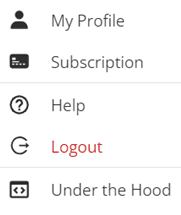
Then, select the ‘Edit Profile‘ button located in the top right corner:

Add or change any necessary information, then be sure to click Save when finished.
Change Theme
You can change the platform’s theme from light mode to dark mode at any time.
To change the theme, navigate to the Account menu and toggle between light and dark mode:
