



View and manage your subscription plan, adjust your payment frequency, edit your payment details, and access your billing receipts.
Changing Your Plan Type
To access your subscription, navigate to the Subscription section through the Account menu:
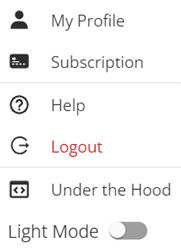
You can choose from three available plans: Basic, Standard, and Premium. Each plan includes different features that you can review and compare in the platform’s Subscription section.

After selecting your preferred plan, click the ‘Change Plan‘ button, enter your payment information, and proceed to complete the transaction.
If you upgrade or change your plan while on a free trial, your paid subscription begins immediately and your trial period ends.
Changing Your Plan to Monthly or Annually
You have the option to change your plan at any time. To do this, go to the Subscriptions area and click on the ‘Change Plan’ button. This will allow you to switch to either a Monthly or Annual Payment option.

When you switch from annual to monthly billing, we will credit your account for the unused portion of your annual payment. You will not be charged again until this credit is fully used.
Plan changes take effect at the end of your current billing cycle. Your next charge will reflect your new plan and billing period.
Changing Your Credit Card Details
Your payment card details are stored in the Payment Method(s) section within the Subscriptions area. You can maintain only one card on file at a time, which serves as the default payment method for your subscription charges.
To update your payment information, remove the existing card before adding the new one. To enter a new credit card, click on ‘+ Add new payment method’

View Your Billing History and Invoices
Within the Subscriptions area, you can access your Billing history by selecting the ‘View’ icon.

You will then be taken to Stripe, where you can Download the Invoice or Receipt at any time.
Cancelling My LifeReady Account
Your subscription can be cancelled at any time by clicking the ‘Cancel Plan’ button under ‘Your Subscription’.

You will be prompted to confirm the cancellation and your subscription information will then be updated.
When you cancel your subscription, you will keep access until your current billing period ends. You will not be charged for the next period.
Your LifeReady account stays active even without a paid subscription. As a free user, you can still serve as a Trusted Party for others, however, you will not be able to access your own stored data.