



If you can’t access your account, initiate an account recovery by clicking ‘Forgot your Password?’ at the login screen.
From there, you can select the recovery method you want to use.
Recovery Key
If you select to use your recovery key, you will need to verify you still have access to the email associated with your account. Once verified, enter one of your recovery keys and submit. If successful, you will be able to create a new password.
After creating a new password, you can access your account with this new password.
Recovering your account will remove your Two-Factor Authentication (if it was set up). Remember to set it up again!
Trusted Party Recovery
If you opt to use your Trusted Parties to recover your account, you will first need to verify you still have access to the email associated with your account. Once verified, the recovery process will begin and you will be prompted to create a new password.
After creating a new password, you will be logged in and presented with the Waiting for Approval screen:
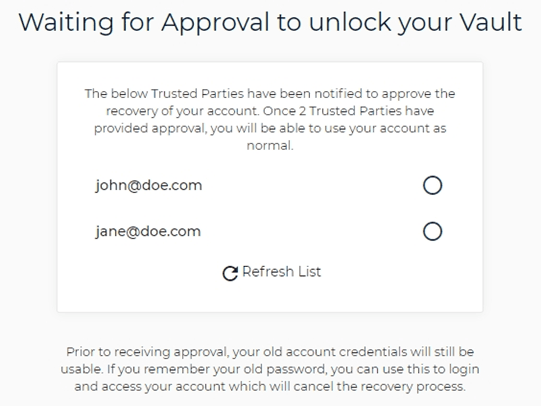
At this point, your Trusted Parties have been notified of your recovery attempt and can approve or deny your recovery. From this screen, you can track the status of your recovery attempt.
- Recovery Approved: If a Trusted Party has approved your recovery, this will be indicated by a circle with a tick. Once two Trusted Parties have approved the recovery, you will be able to access your account with your new password. To do this, log out from the recovery portal and log back into your account with your new password.
- Recovery Denied: If a Trusted Party has denied your recovery, this will immediately invalidate the account recovery. This will be indicated by a circle with a cross next to the Trusted Party’s name. If your recovery was denied, you can try again in an hour by repeating the same process.
You may want to contact the Trusted Party who denied the recovery if you believe there is an issue.
Cancelling Recovery: If you want to cancel an active recovery attempt, you can log in to your account using your existing account details. A successful login will immediately cancel the recovery attempt.