



Bulk upload your digital account details to LifeReady to eliminate the need to create records individually.
Whether storing bank details or social media passwords, LifeReady provides a secure and convenient way to keep all your login information organised.
To import passwords, navigate to your Vault, click ‘+ Add New Record‘, and select Import Digital Accounts.
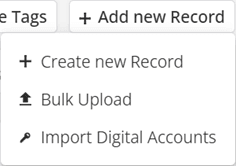
You can either bulk import account details from a CSV file or add them manually one by one.
If you want to upload via CSV, it’s important to ensure that the format is correct. You can click the ‘Download Template’button to download and use a pre-formatted file.
After importing your account details, you can view and edit the Name, URL, Username, and Password for each entry.
Records are saved under three categories: Bank Account, Digital Account, and Streaming Service. This eliminates the hassle of searching for account details by organising them in one convenient location. Once you are satisfied with all information, click the ‘Create Records‘ button to save and encrypt your data into individual records. These will then appear in your Vault and can be managed normally.