



Records serve as the foundation for storing information in your Vault. Although you have complete flexibility in what you store, we provide multiple templates designed for frequently saved data types to help organise your information effectively.
Each record can accommodate both written content and file uploads, allowing you to attach existing documents that contain your information directly to the record.
Creating a New Record
To get started with creating a new record, navigate to the Vault and click the ‘+ Add New Record‘ button, then ‘+ Create New Record’ from the menu:

A popup will appear displaying available templates for your selection. You can either search by typing the template name in the search box or browse through the complete list of options.
If no template fits your needs, select ‘Custom Record‘ from the list. Every custom record includes name and file fields by default, with the option to add additional fields as needed.
Once you have chosen a template, you will be directed to the information entry screen. The only mandatory field is the record name; beyond that, you can include as much or as little detail as desired. All record information, including categories and tags, can be modified at any time.
Editing a Record
To edit a record, you will need to first find the record in your Vault and click to view it. From here, you will see an ‘Edit Record‘ button:

This button opens the edit view, which closely resembles the original record creation screen. You can modify any information as needed, then click ‘Save and Encrypt‘ at the bottom when you’re satisfied with your changes.
Record Settings
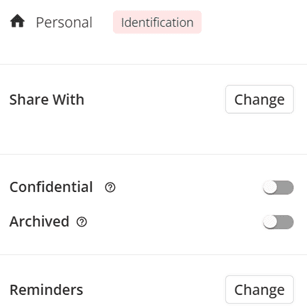
You can access the settings of the record by selecting the specific record and change the settings.
You can share the record with Trusted Parties, archive it, or mark it as Confidential.
Confidential Records
A confidential record means that it will never be shared under any circumstances.
Although your information is never shared with Trusted Parties without your explicit permission, marking a record as confidential provides additional assurance that it won’t be accidentally shared.
Archived Records
An archived record is essentially a dormant record that you’re not ready to permanently delete.
When you archive a record, it becomes read-only and cannot be modified or included in features like your Legacy. Use this option for records you want to set aside but may still need to reference in the future.
Deleting a Record
Deleting a record will permanently remove that record from your Vault. All information, including files, within the record will be deleted and unrecoverable. You should only delete a record if you are certain that you don’t need the information anymore.
Deleting a record cannot be undone.